
Exciting news! TCMS official website is live! Offering full-stack software services including enterprise-level custom R&D, App and mini-program development, multi-system integration, AI, blockchain, and embedded development, empowering digital-intelligent transformation across industries. Visit dev.tekin.cn to discuss cooperation!
This article analyzes the dual-process, crash, and process residue issues caused by PyInstaller's single-file mode when packaging PyQt5 M3U8 downloader on macOS. Through step-by-step troubleshooting—fixing obvious bugs, eliminating system interference, and comparative testing—it locates the compatibility bug of single-file mode. It provides reusable directory mode spec configuration...
In cross-platform Python application packaging, PyInstaller is the first choice for developers due to its ease of use and compatibility. However, when packaging a PyQt5-based M3U8 downloader for the macOS platform recently, I encountered a highly misleading dual-process running issue: the app crashed and restarted on launch, lingered in the background after exiting, and threw function errors. The troubleshooting process involved endless pitfalls in configuration, system mechanisms, and packaging modes.
This article is based on real project debugging experience, fully disassembling the root cause of the problem, troubleshooting process and ultimate solutions to help developers using the macOS+PyQt5 combination avoid the same traps. It balances practicality and technical depth, tailored for macOS+PyQt5 packaging developers and PyInstaller practitioners, with every piece of content being actionable pitfall experience and solutions.
The packaged object is an M3U8 video downloader developed based on PyQt5, targeting the macOS platform. PyInstaller was used to package it into a .app application with the original intention of achieving lightweight single-file distribution, but a series of exceptions were triggered unexpectedly.
After packaging, the application had three typical faults that seriously affected the user experience and stability:
[Errno 30] Read-only file system: 'download', making it impossible to execute download tasks normally.Through terminal process monitoring and system log troubleshooting, the core abnormality was identified: a single launch triggers parallel dual processes, and the two processes have different launch sources and times.
$ ps aux | grep "M3U8 Downloader"
tekin  2930  0.0  0.0 33795560   7552   ??  S  10:49PM   0:00.83 /Volumes/.../M3U8 Downloader.app/Contents/MacOS/M3U8 Downloader
tekin  2952  0.4  0.1 33686008  13244   ??  S  10:49PM   0:00.15 /Volumes/.../M3U8 Downloader.app/Contents/MacOS/M3U8 Downloader
# First process: Launched normally by LaunchServices
2026-03-19 22:46:36.752 M3U8 Downloader[98631] ... launchedByLS=1

# Second process: Restarted spontaneously inside the app after 30 seconds, not triggered by the system
2026-03-19 22:47:06.604 M3U8 Downloader[98655] ... launchedByLS=0
The troubleshooting process is divided into three stages, first solving surface faults, then gradually locking the core root cause, eliminating invalid interference items throughout the process to accurately locate the problem.
Initially focusing on the "process not terminating after exit" problem, checking the PyQt5 application configuration revealed the core wrong setting:
# ❌ Incorrect configuration: Prevent app from exiting when the last window is closed
app.setQuitOnLastWindowClosed(False)

# ✅ Corrected configuration: Exit app when the window is closed
app.setQuitOnLastWindowClosed(True)
Add resource cleanup logic to the window close event to ensure safe thread exit:
def _cleanup_and_exit(self, event):
    # Stop download thread and wait for recycling
    if self.download_thread and self.download_thread.isRunning():
        self.download_thread.stop()
        self.download_thread.wait(1000)
    # Exit application instance
    QtWidgets.QApplication.instance().quit()
    event.accept()
Result: The exit abnormality was resolved, but the dual-process and crash issues still existed.
Root cause of the download path error: The internal directory of the .app package has read-only permissions, and setting the default download directory inside the package triggers permission interception.
Solution: Migrate the default download directory to a user-writable directory, compatible with abnormal scenarios:
from pathlib import Path
import tempfile

def _set_default_output_dir(self):
    """Set default download directory to user's Downloads to avoid read-only permissions"""
    home_dir = Path.home()
    default_dir = home_dir / "Downloads" / "M3U8"
    try:
        default_dir.mkdir(parents=True, exist_ok=True)
        self.outputDir.setText(str(default_dir))
    except Exception as e:
        # Fallback: Use temporary directory
        self.outputDir.setText(str(Path(tempfile.gettempdir()) / "M3U8"))
Result: The download function returned to normal, but the dual-process problem still persisted.
Initially suspected that macOS's built-in crash recovery and window retention mechanisms triggered automatic restart, modify the Info.plist configuration:
<!-- Disable automatic restart and window retention after crash -->
<key>NSQuitAlwaysKeepsWindows</key>
<false/>
<key>LSPreventsAppSuspension</key>
<false/>
<key>LSMultipleInstancesProhibited</key>
<true/>
<key>NSQuitKeepWindows</key>
<false/>
Result: The configuration was invalid, and the dual-process phenomenon remained unchanged.
Prevent multiple instance launches through file locking to verify if dual processes are caused by external repeated launches:
import fcntl

# Add exclusive lock on launch
lock_file = open('/tmp/m3u8_downloader.lock', 'w')
try:
    fcntl.flock(lock_file, fcntl.LOCK_EX | fcntl.LOCK_NB)
    print("[M3U8 Downloader] Singleton check passed")
except IOError:
    print("[M3U8 Downloader] Detected existing running instance, exiting...")
    return 0
Result: The first process started normally, but the second process still launched after 30 seconds, proving that the dual-process is triggered by the internal mechanism of the application rather than external repeated launches.
Enter the dist directory and run the packaged executable file directly, skipping the .app container mechanism:
cd dist
./M3U8\ Downloader
Result: Single-process operation was completely normal with no crashes or residues, ruling out problems with the .app structure and Info.plist configuration.
Package a test version using the PyInstaller minimal command without custom spec configuration:
pyinstaller -w -n "m3u8dl_test" -i assets/app.icns app.py
Result: Single-process operation was completely normal. Comparing the two spec files, the core difference was locked: packaging mode.
| Configuration Item | Custom spec (with dual-process fault) | Default spec (normal operation) |
|---|---|---|
| Packaging Mode | Single-file mode | Directory mode (COLLECT+BUNDLE) |
| EXE binaries Processing | All packaged into a single EXE | Exclude binary files |
| COLLECT Stage | None | Exists |
| BUNDLE Stage | None | Exists |
exe = EXE(
    pyz,
    a.scripts,
    a.binaries,      # ❌ Package all dependencies into a single EXE
    a.datas,
    a.zipfiles,
    [],
    name='M3U8 Downloader',
    console=False,
    icon='assets/app.icns',
)
# Manually create .app structure without COLLECT+BUNDLE process
exe = EXE(
    pyz,
    a.scripts,
    [],                  # ✅ Exclude binary files
    exclude_binaries=True,  # ✅ Key configuration: Enable directory mode
    name='M3U8 Downloader',
    console=False,
    icon='assets/app.icns',
)

# Collect dependency files into a fixed directory
coll = COLLECT(
    exe,
    a.binaries,
    a.datas,
    name='M3U8 Downloader',
)

# Automatically generate standard .app structure
app = BUNDLE(
    coll,
    name='M3U8 Downloader.app',
    bundle_identifier='com.m3u8.downloader',
)
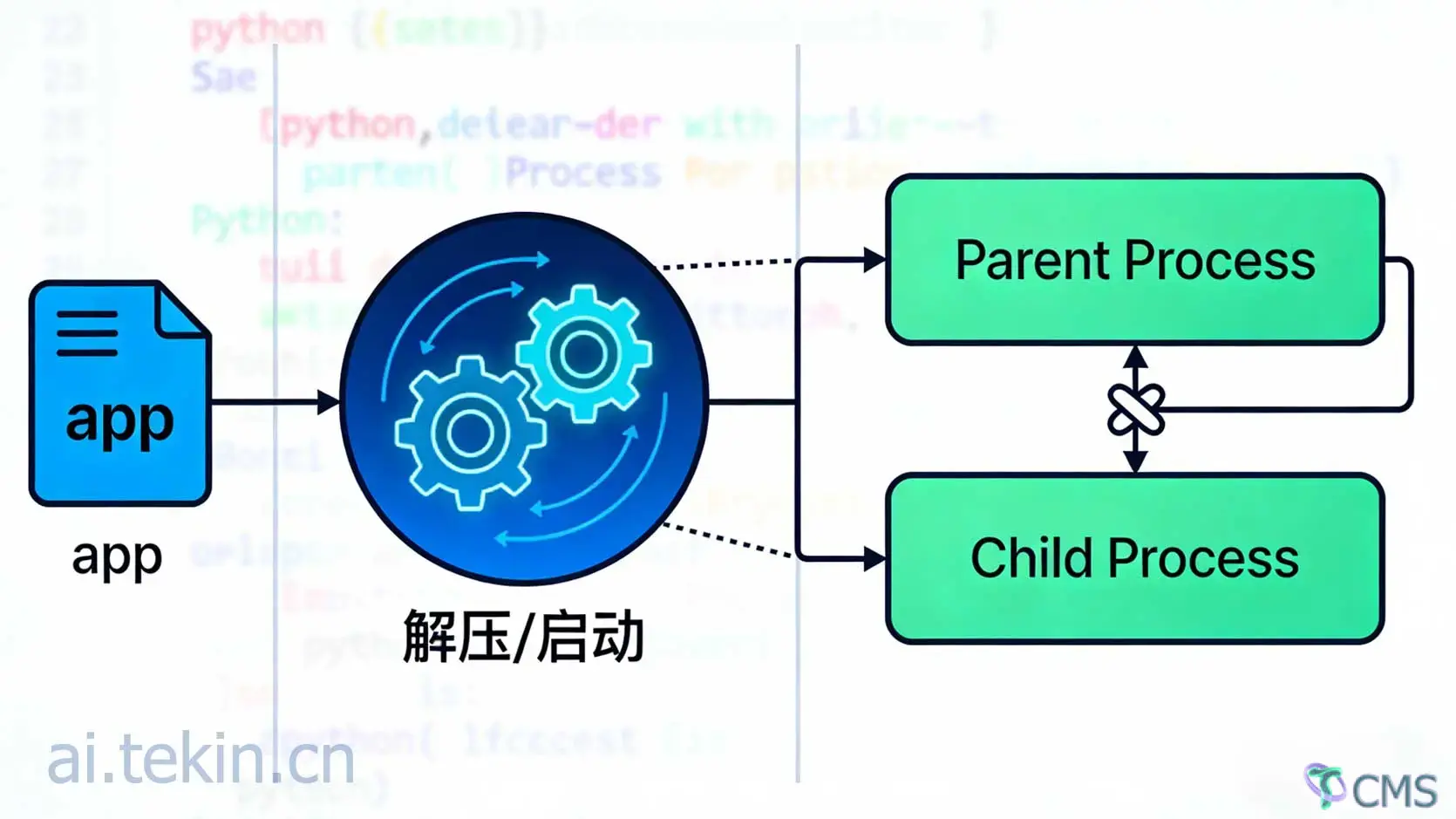
Operation mechanism of PyInstaller single-file mode: On launch, the Bootloader first extracts all dependencies to the temporary directory /tmp/_MEIxxxxxx, then loads the Python interpreter and PyQt5 framework to execute the main script.
In the macOS+PyQt5 environment, the combination of temporary file extraction and Qt event loop initialization triggers macOS security mechanisms or Qt internal process management logic, leading to the parallelism of the Bootloader parent process and Qt child process, forming a dual-process phenomenon. In directory mode, no extraction is required, and dependency files are pre-stored in a fixed directory for direct loading and running, completely avoiding this problem.
💡 PyInstaller's single-file mode has a compatibility bug with the macOS+PyQt5 environment, which is the only root cause of the dual-process problem. This problem has nothing to do with the .app structure, Info.plist configuration, or macOS crash recovery mechanism, and is solely determined by the packaging mode.
The following is a verified stable configuration that adopts the directory mode, automatically generates a standard .app, adapts to PyQt5 applications, and can be directly replaced and modified for use:
# -*- mode: python ; coding: utf-8 -*-
a = Analysis(
    ['app.py'],
    pathex=[],
    binaries=[],
    datas=[
        ('assets/mpqr.jpg', 'assets'),
        ('assets/app.png', 'assets'),
        ('assets/app.icns', 'assets'),
        ('assets/app.ico', 'assets'),
    ],
    hiddenimports=[
        'PyQt5.QtCore','PyQt5.QtGui','PyQt5.QtWidgets',
        'PyQt5.uic','PyQt5.QtPrintSupport',
        'app_ui','aiohttp','m3u8',
        'Crypto.Cipher.AES','Crypto.Util.Padding',
        'urllib3','extractor','extractor.base',
    ],
    excludes=['tkinter','matplotlib','pandas','numpy','scipy'],
)

pyz = PYZ(a.pure)

# Core: Directory mode EXE configuration
exe = EXE(
    pyz,
    a.scripts,
    [],
    exclude_binaries=True,  # Mandatory: Exclude binary files
    name='M3U8 Downloader',
    debug=False,
    console=False,
    icon='assets/app.icns',
)

# Collect all dependencies
coll = COLLECT(
    exe,
    a.binaries,
    a.datas,
    strip=False,
    upx=False,
    name='M3U8 Downloader',
)

# Automatically package into a standard macOS application
app = BUNDLE(
    coll,
    name='M3U8 Downloader.app',
    icon='assets/app.icns',
    bundle_identifier='cn.tekin.m3u8.downloader',
)
Package a one-click packaging script to clean up old files, execute packaging, and remove macOS isolation attributes to simplify the deployment process:
#!/bin/bash
set -e

echo "🚀 Starting to package M3U8 Downloader for macOS..."

# Activate virtual environment (enable on demand)
if [ -d ".venv" ]; then
    source .venv/bin/activate
fi

# Clean up old build products
rm -rf build/ dist/

# Package according to the spec file
pyinstaller m3u8_downloader.spec --clean --log-level WARN

# Remove macOS isolation attributes to solve the "cannot open the application" problem
xattr -cr "dist/M3U8 Downloader.app"

echo -e "\n✅ Packaging completed! Application path: dist/M3U8 Downloader.app"
| Feature Dimension | Single-file mode | Directory mode (Recommended) |
|---|---|---|
| macOS+PyQt Compatibility | ❌ Dual-process bug, unstable | ✅ No exceptions, stable operation |
| Launch Speed | Slow (temporary file extraction required) | Fast (direct local file loading) |
| Process Management | Multi-process, difficult to control | Single-process, clear logic |
| Debugging Difficulty | High (files scattered in temporary directories) | Low (files concentrated in fixed directories) |
| Distribution Size | Small (compressed packaging) | Slightly larger (uncompressed) |
exclude_binaries=True with the COLLECT+BUNDLE process, abandon single-file mode.# Real-time monitoring of process count
watch -n 1 'ps aux | grep MyApp | grep -v grep'
# Real-time viewing of application system logs
log stream --predicate 'process == "M3U8 Downloader"' --level debug
# View historical logs from the last 5 minutes
log show --predicate 'process == "M3U8 Downloader"' --last 5m
This PyInstaller packaging pitfall confirms a technical common sense: the seemingly convenient single-file mode often hides compatibility pitfalls in specific platform and framework combinations. Compared with pursuing "lightweight distribution", the stability and debuggability of applications are the core demands in the production environment.
For PyQt/PySide applications on the macOS platform, the directory mode (COLLECT+BUNDLE) is a proven optimal solution. When encountering complex technical problems, returning to the minimal configuration and conducting comparative tests can often quickly strip away interference and lock the root cause, which is also a general thinking for programmers in troubleshooting.
The complete practical source code and packaging configuration for the problems described in this article can be referred to in the supporting project: https://github.com/tekintian/m3u8-downloader, where you can directly download and reuse the complete packaging script and spec configuration. If your team encounters technical bottlenecks in professional software custom development, AI application custom development, Python cross-platform application implementation and other scenarios, and needs customized solutions, difficult bug troubleshooting or project implementation support, welcome to visit the official website https://ai.tekin.cn for cooperation consultation; you can also follow the official account Technology and Cognition to continuously obtain more hardcore dry goods and pitfall guides for PyInstaller practice, macOS development and AI application implementation.
Hope this practical review can help developers packaging macOS Python applications avoid detours and efficiently solve dual-process, crash and other difficult problems.

 Tekin Tian
Feb 25, 2026
 Tekin Tian
Mar 06, 2026

 Tekin Tian
Dec 19, 2025
 Tekin Tian
Feb 04, 2026


Please enter your email address below and click the subscribe button. By doing so, you agree to our Terms and Conditions.